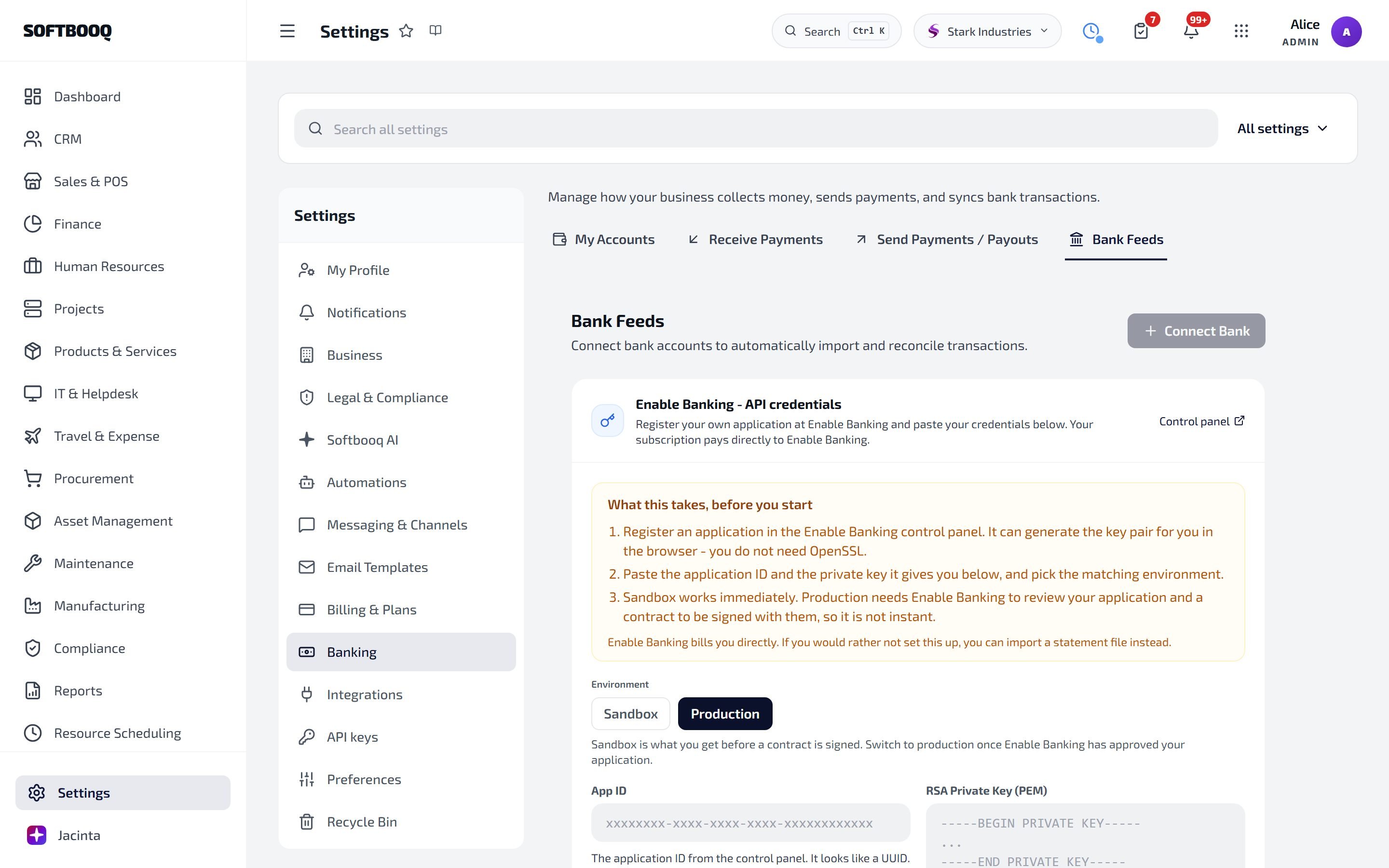
Bank Feeds connect your business bank account to Softbooq so transactions appear in Finance automatically and can be matched to invoices and bills without manual entry. The integration is powered by Enable Banking, a licensed PSD2 / Open Banking provider covering 2,500+ banks in the EU, UK, EEA, and Switzerland.

What you get

  • Live transaction sync from your business current account, savings accounts, and credit cards
  • Automatic reconciliation against invoices and vendor bills via the Reconciliation Workbench
  • 90 days of historical transactions on first connect
  • 180-day rolling consent window (PSD2 standard); reauth required twice yearly
  • No screen-scraping or stored credentials, all access uses regulated open-banking APIs
Enable Banking is licensed as an AISP (Account Information Service Provider) under PSD2. Softbooq itself never sees or stores your bank login credentials. The OAuth-style consent happens entirely on your bank’s domain.

Connect a bank account

1

Open Settings → Integrations → Bank Feeds → Connect

Bank Feeds requires a Standard plan or above and a fully verified company profile.
2

Pick your bank

Search the country and bank list. Most major EU and UK banks are supported, including Barclays, HSBC, NatWest, BNP Paribas, ING, Nordea, Revolut Business, Wise Business, and many regional and challenger banks.
3

Authenticate at your bank

You are redirected to your bank’s login screen via Enable Banking. Authenticate with your usual bank credentials and confirm the consent on the bank’s screen. Softbooq does not see any of this.
4

Pick which accounts to share

Most banks let you select specific accounts to grant read access to. Tick only the business accounts you want connected.
5

Wait for the initial backfill

Up to 90 days of historical transactions are pulled in. Larger accounts can take a few minutes. You can leave the page; you’ll get a notification when it completes.

How sync runs

After the initial backfill, transactions are fetched on a 4-hour schedule. Most banks support push notifications via webhooks; for those, new transactions appear within minutes. For banks without push support the 4-hourly poll catches new activity. A nightly job cross-checks the previous 7 days of transactions to repair any gaps caused by missed webhook deliveries.

Auto-reconciliation

The Auto-Reconciliation Engine compares incoming bank transactions against your Softbooq invoices, vendor bills, expense claims and payment runs. It uses three confidence levels:
  • HIGH — exact reference + amount + date match. Auto-applied with no human review.
  • MEDIUM — close match (e.g. amount matches, reference partial). Surfaced for one-click confirmation.
  • LOW — fuzzy match. Suggested but not applied; you confirm or reject.
Unmatched transactions stay in the Reconciliation Workbench (Reports → Reconciliation Workbench) until you assign them or rule them out. See the Reports page for how to use it.
PSD2 mandates that account access consent must be renewed by the customer at least every 180 days. Two weeks before expiry, you’ll receive an in-app banner and an email asking you to reauth. Click the banner and complete the bank login flow again. If consent is missed your sync will stop until you renew, but historical data is kept.

Disconnect

1

Open Settings → Integrations → Bank Feeds → Account → Disconnect

2

Confirm

The consent token is revoked at Enable Banking and at your bank. Sync stops immediately.
3

Historical transactions are kept

Already-imported transactions remain in Softbooq for reporting and reconciliation. Only the live feed stops.

Troubleshooting

If your bank is not searchable, it has not been onboarded by Enable Banking yet. Contact Softbooq support with the bank name and country; we will request integration on your behalf.
PSD2 consent expired. You should have received an in-app banner two weeks before expiry. Open Settings → Integrations → Bank Feeds → Reauth and complete the bank login again.
Some banks report all transactions as positive amounts with a separate debit/credit indicator. Softbooq normalises this; if you see a credit appearing as a debit (or vice versa), report it to support with the transaction’s bank reference and we will tune the parser for that bank.
The HIGH-confidence auto-match requires an exact reference. If your bank truncates or modifies references (some do, e.g. removing special characters), the engine may downgrade to MEDIUM or LOW. Use the Reconciliation Workbench to confirm those manually; the system learns from your confirmations and improves matching over time.

See also

Finance

Where bank transactions appear and reconciliation happens.

Reconciliation Workbench

The interface for confirming and managing matches.

Outbound Payments

Pay vendor bills from the same bank account via Wise or Revolut.