

Choose how you pay
In Settings → Banking → Send Payments / Payouts:- Bank File Export needs no setup and is always on. Softbooq makes a file in your bank’s format and you upload it in your online banking.
- Wise Business: enter an API Token and your business Profile ID, choose Save Wise Settings, then Verify Connection. Create the token in Wise → Settings → Developer tools → API tokens.
- Revolut Business: enter an API Token and the Account ID of the account to pay from, choose Save Revolut Settings, then Verify Connection. Create the token in Revolut Business → Settings → API → Personal API key.
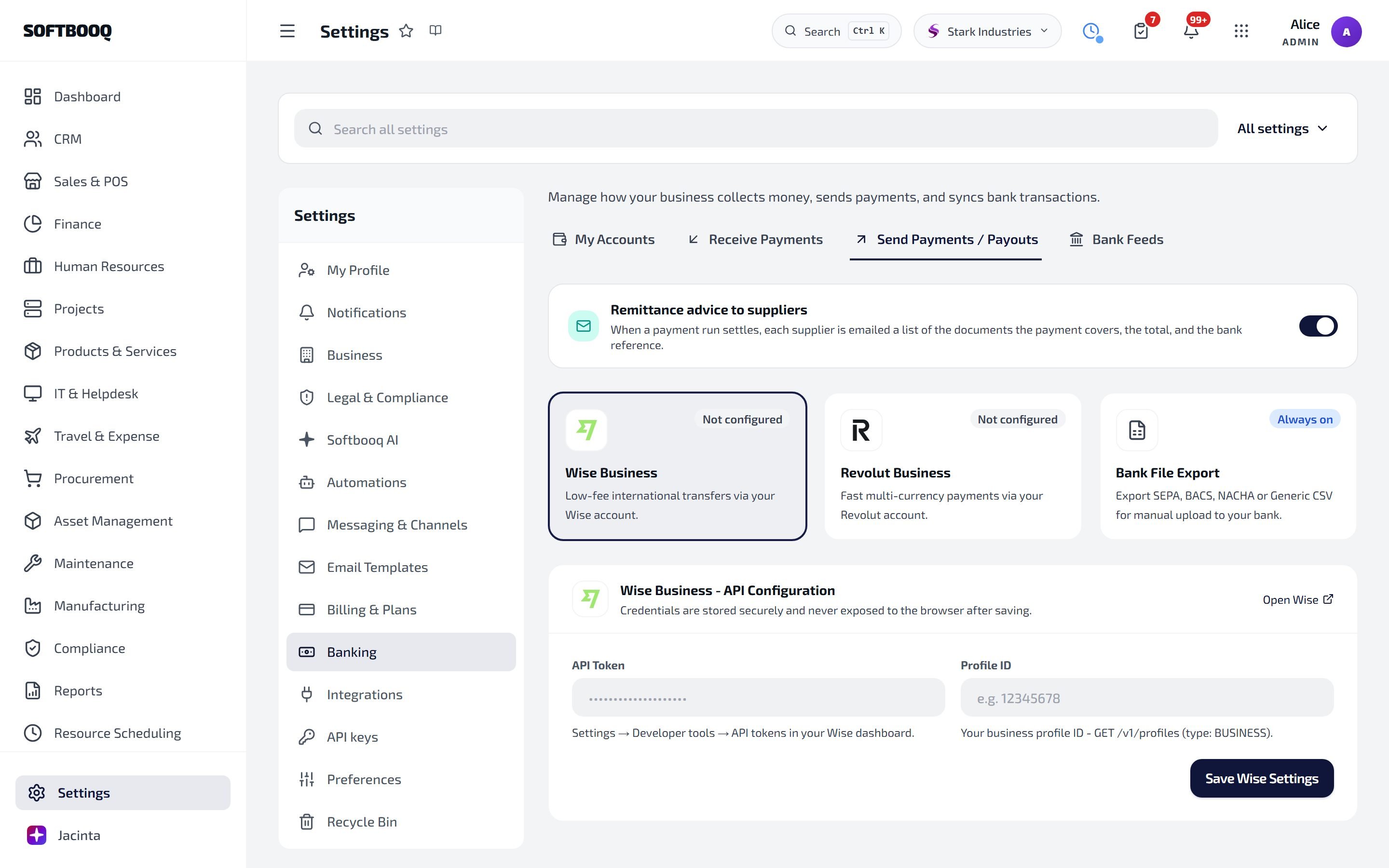
Send Payments / Payouts: Wise, Revolut and the always-on bank file, with remittance advice above them.
Make a payment run
1
Open Finance → Purchases → Payment Runs
Choose New Payment Run.
2
Pick what to pay
Give the run a name if you like, the Scheduled Payment Date and the account to Pay from. Then choose from:
- Bills that are due and not yet paid (a bill can be paid in part)
- POs that have been received or billed
- Expenses that have been approved
- Reimbursements waiting to be paid
- Payroll: wages not yet paid
3
Approve
The run starts as a draft. Approve it. Someone other than the person who made the run approves it, unless only one person in your workspace can approve.
4
Pay
- Through Wise or Revolut: choose Pay via Wise or Pay via Revolut. Use Sync Wise or Sync Revolut to check on the transfers. Once they have all gone through, the run confirms itself.
- Through your bank: choose Export and a format (SEPA XML, BACS CSV, NACHA ACH, ABA (Cemtex) or Generic CSV), upload the file in your online banking, and once your bank has paid it, choose Confirm Paid.
- Already paid another way: Already paid these confirms the run without a file.
Your bank’s own layout
If your bank wants a file none of the standard formats match, use Bank file layout (or Set up my bank’s layout… in the Export list) to describe it once. It then appears at the top of the Export list.Cancel a run
Until it is confirmed, a run can be cancelled with Cancel Run, with a reason if you like.Who can do this
Seeing payment runs is one permission. Making, approving, paying and cancelling them is another, so someone can follow runs without being able to send money.See also
Bank Feeds
Bring your bank transactions in.
Finance
Bills, expenses and your books.
Procurement
Purchase orders and suppliers.