> ## Documentation Index
> Fetch the complete documentation index at: https://docs.softbooq.com/llms.txt
> Use this file to discover all available pages before exploring further.
# Books Health
> Whether your books can be trusted, what to fix first, and the repairs it offers
Books Health checks your books and tells you in plain words whether your figures can be trusted. Open it in **Finance → Dashboard → Books Health** (it is also under **Accounting**).
## What it tells you
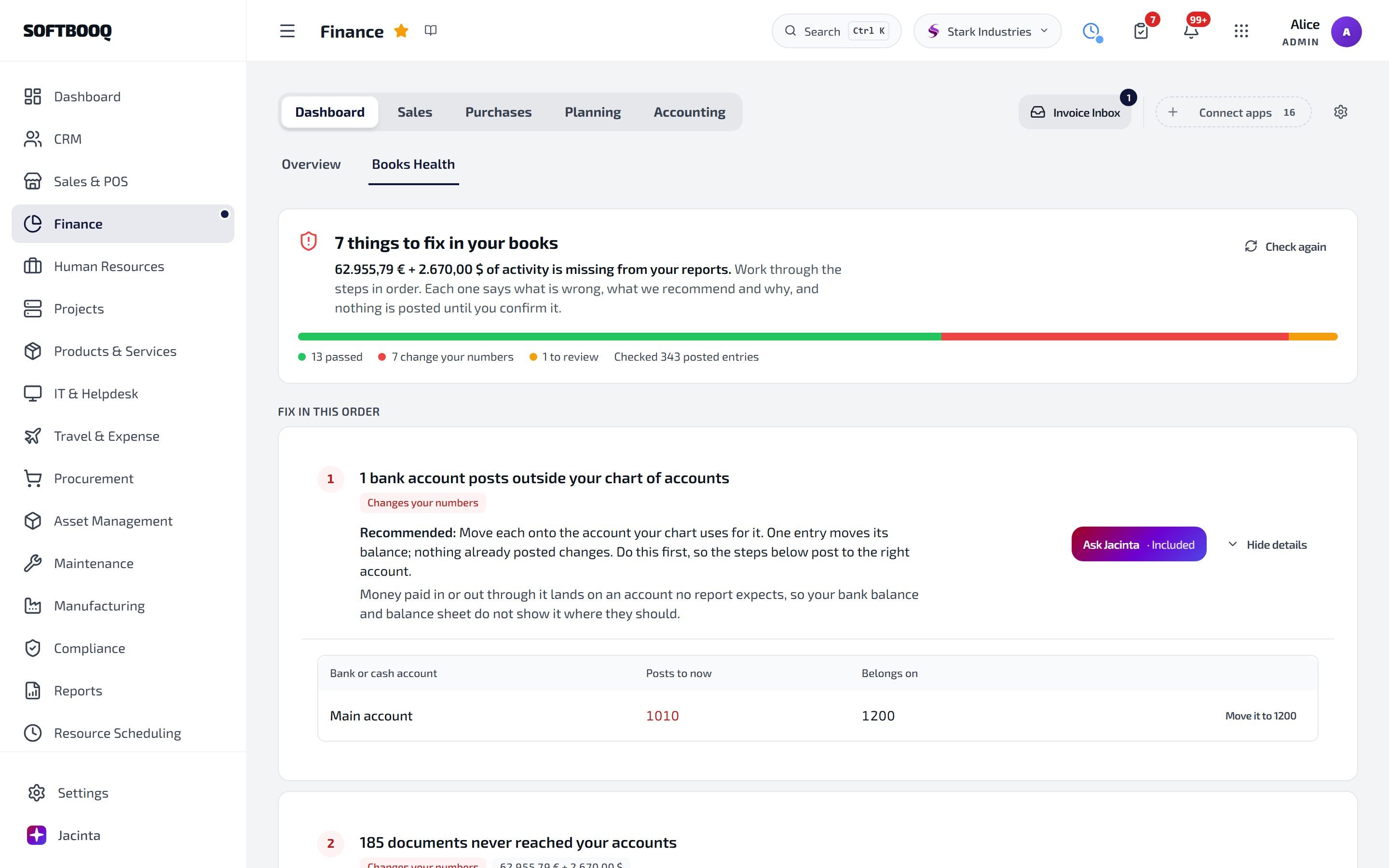 At the top you see one of three answers:
* **Your books are in good shape**
* **Your books balance - N things to review**: nothing is wrong in the totals, but something deserves a look
* **N things to fix in your books**
Problems are listed under **Fix in this order**, and checks that passed under **Passed**. Anything it could not check is shown as **Not checked**, never counted as passed. Use **Check again** after a fix.
## What it checks
Among the checks:
* Your balance sheet adds up, your profit figure matches the balance sheet, and every account appears on a report
* Documents that never reached your accounts
* Supplier bills that are booked but still marked draft
* Employee expense claims booked as owed to a supplier
* Foreign-currency entries counted at the wrong exchange rate, or at a rate of exactly 1
* Paid shop orders that are not in your books, and shop orders with no cost of goods
* Documents whose VAT on your VAT return differs from your ledger
* Things in your books that have no account in your chart
## Repairs
Where Books Health can fix a problem, it offers the repair next to it, for one item or all of them (for example **Post it** or **Post all**). Before anything happens, a confirmation says exactly what the repair does: a missing journal entry, for instance, is written through the normal posting code with the document's own date and amounts, and if an entry already exists, nothing is posted.
To understand a problem first, choose **Ask Jacinta** next to it. See [Jacinta on problem screens](/erp/jacinta-help).
## See also
The rest of Finance.
Statements that are withheld when they cannot be reconciled to the ledger.
Explanations in plain words.
This documentation is built and hosted on [Mintlify](https://mintlify.com), a developer documentation platform.
At the top you see one of three answers:
* **Your books are in good shape**
* **Your books balance - N things to review**: nothing is wrong in the totals, but something deserves a look
* **N things to fix in your books**
Problems are listed under **Fix in this order**, and checks that passed under **Passed**. Anything it could not check is shown as **Not checked**, never counted as passed. Use **Check again** after a fix.
## What it checks
Among the checks:
* Your balance sheet adds up, your profit figure matches the balance sheet, and every account appears on a report
* Documents that never reached your accounts
* Supplier bills that are booked but still marked draft
* Employee expense claims booked as owed to a supplier
* Foreign-currency entries counted at the wrong exchange rate, or at a rate of exactly 1
* Paid shop orders that are not in your books, and shop orders with no cost of goods
* Documents whose VAT on your VAT return differs from your ledger
* Things in your books that have no account in your chart
## Repairs
Where Books Health can fix a problem, it offers the repair next to it, for one item or all of them (for example **Post it** or **Post all**). Before anything happens, a confirmation says exactly what the repair does: a missing journal entry, for instance, is written through the normal posting code with the document's own date and amounts, and if an entry already exists, nothing is posted.
To understand a problem first, choose **Ask Jacinta** next to it. See [Jacinta on problem screens](/erp/jacinta-help).
## See also
The rest of Finance.
Statements that are withheld when they cannot be reconciled to the ledger.
Explanations in plain words.
This documentation is built and hosted on [Mintlify](https://mintlify.com), a developer documentation platform.